Categories
Feature Problem solving Resources

Mapping for Knowledge Work

A Step-by-Step Whiteboard Exercise to Visualise Information Flows and Identify Delays

In today’s fast-paced world, organisations are striving to enhance efficiency and productivity. While much of the focus has been on streamlining physical processes, it’s crucial not to overlook knowledge work—the intellectual activities that involve generating, sharing, and applying information. For teams engaged in knowledge work, understanding and optimising workflows can lead to significant improvements. One powerful tool for achieving this is Value Stream Mapping (VSM).

What is Value Stream Mapping?

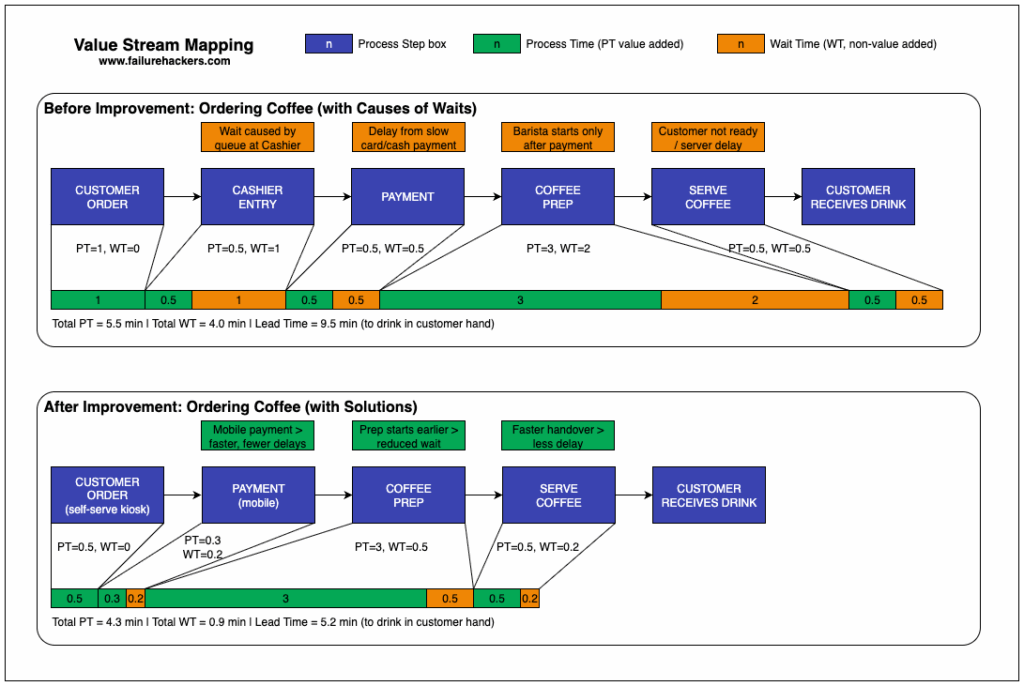
Value Stream Mapping is a lean management technique used to visualise the flow of materials and information required to bring a product or service to the customer. In the context of knowledge work, it helps teams understand how information flows through an organisation, highlighting areas where delays or inefficiencies occur.

Why Use VSM for Knowledge Work?

  1. Clarifies processes: By mapping out workflows, teams can see the entire picture, including hand-offs between team members and departments.
  2. Identifies waste: VSM helps to pinpoint areas of waste—activities that do not add value to the end product or service.
  3. Encourages collaboration: The exercise of creating a value stream map fosters open discussion among team members, resulting in shared understanding and commitment to improvement.
  4. Enhances continuous improvement: VSM aligns with the principles of continuous improvement by providing measurable insights.

Preparing for the Whiteboard Exercise

Before diving into the mapping exercise, it’s essential to prepare adequately. Here’s how you can set the stage:

1. Gather Your Team

Bring together individuals involved in the workflow you wish to analyse. This could include team members from different departments, stakeholders, and anyone who contributes to or relies on the flow of information.

2. Define the Scope

Clearly outline the process you intend to map. It could be a specific project timeline, a product development cycle, or a customer service process. Be precise about where the mapping will begin and end.

3. Set Up Your Whiteboard

You’ll need a large whiteboard or several flip charts. Ensure you have markers in different colours to distinguish elements within your map. You may also want sticky notes, which can help in representing individual tasks or elements flexibly.

Step-by-Step Whiteboard Exercise to Map Information Flows

Let’s break down the exercise into manageable steps. 

Step 1: Identify Customer Value

Start by asking, “What does our customer consider valuable?” Write this at the top of the whiteboard to keep the team focused on delivering value. Discuss how your team’s output supports customer needs.

Step 2: List Major Activities

Ask team members to identify the major activities involved in delivering the knowledge work. Typical activities might include research, writing, reviewing, and distribution. Write these down in sequential order along the left side of the whiteboard. Use arrows to indicate the flow from one activity to the next.

Step 3: Map Information Flows

Now, illustrate the flow of information between activities. Use arrows or lines to connect the activities, showing how information is transmitted. For example, after research, information may flow to a writer, who then passes their draft to a reviewer. Label the arrows with the type of information shared (e.g., draft documents, feedback) and any tools used (e.g., email, collaboration software).

Step 4: Identify Hand-Off Points

Look for points where ownership of tasks changes—these are critical hand-off points. Mark these distinctly on the whiteboard. Discuss the implications of each hand-off. Is there a risk of miscommunication? Does information get lost or delayed? Engage the team in identifying potential problems that may arise during these transitions.

Step 5: Assess Delays and Waste

Next, assess each step for potential delays. Use symbols to represent different types of waste according to Lean principles (e.g., overproduction, waiting, defects). As you discuss each step, ask questions like:

  • How long does each task take?
  • What factors contribute to delays?
  • Are there redundant steps that could be eliminated?

Encourage team members to share experiences and insights. Document identified problems next to the relevant activities.

Step 6: Highlight Opportunities for Improvement

Once you’ve assessed the workflow, shift focus to potential improvements. Brainstorm ideas collectively. For instance, could any steps be automated? Can communication be streamlined? Are there tools that would facilitate smoother transitions? Use sticky notes for proposed solutions and place them next to the relevant activities.

Step 7: Create an Action Plan

Conclude the exercise by developing an action plan based on your mapping. Assign team members to specific tasks, define timelines, and establish follow-up meetings to track progress. Document all insights and decisions made during the exercise for future reference.

Post-Exercise Reflection

After the session, take time to reflect on what you’ve learned. Encourage team members to share feedback on the exercise itself—what worked well, what could be improved, and how they felt about the discussions. This reflection will help refine the approach for future VSM exercises.

Practical Application

To apply the knowledge gained from your VSM exercise, consider implementing the following actions:

  1. Keep the Map Visible: Display the value stream map in your workspace as a constant reminder of the identified processes and areas for improvement.
  2. Regular Reviews: Schedule regular review sessions (e.g., monthly or quarterly) to revisit the map, assess changes, and identify new areas for optimisation.
  3. Document Changes: Track changes made as a result of the exercise and measure their impact. Collect data on time saved, reduction in errors, or improved communication to demonstrate the value of the exercise.
  4. Cultivate a Continuous Improvement Culture: Encourage team members to regularly identify and propose improvements, fostering an environment that values innovation and efficiency.

Conclusion

Value Stream Mapping is a powerful tool for analysing and optimising workflows in knowledge work. By visually representing information flows, hand-offs, and delays, teams can collaboratively pinpoint inefficiencies and develop actionable solutions. Engaging in this whiteboard exercise not only enhances understanding but also fosters a culture of continuous improvement. So gather your team, set up your whiteboard, and start mapping the value stream today—your customers (and your team) will thank you for it!

Categories
Feature Problem solving Resources

How to Prototype Service Blueprints

How to Prototype Service Blueprints to Map Interactions and Identify Hidden Failure Points

In today’s competitive landscape, delivering exceptional customer experiences is more crucial than ever. One powerful tool that can help you visualise and improve these experiences is a service blueprint. This structured diagram maps out various service interactions, revealing the complexities of customer journeys while highlighting areas prone to failure. In this blog post, we will explore how to create a service blueprint to map service interactions and identify hidden failure points, with a downloadable canvas to aid your efforts.

What is a Service Blueprint?

A service blueprint is a detailed visual representation of the service delivery process, intertwining the customer journey with backend processes. It typically includes key components such as customer actions, frontstage interactions (customer-facing activities), backstage interactions (supporting activities), and support processes. By laying out these elements, a service blueprint allows organisations to better understand their services and pinpoint where improvements can be made.

Why Create a Service Blueprint?

Creating a service blueprint provides several benefits:

  1. Enhanced Understanding: It helps team members comprehend the entire service process, promoting collaboration.
  2. Identifying Bottlenecks: By visualising interactions, teams can easily spot inefficiencies or potential points of failure.
  3. Improved Customer Experience: Understanding the customer journey enables organisations to tailor their services to better meet consumer needs.

Step-by-Step Guide to Prototyping Your Service Blueprint

Step 1: Gather Your Team

Start by assembling a cross-functional team that includes stakeholders from different departments. Diverse perspectives can yield richer insights into the overall service experience.

Step 2: Define the Service and Target Audience

Clearly outline the service you are mapping and identify your target audience. Understanding who your customers are helps you focus on their specific needs and interactions throughout the service process.

Step 3: Identify Key Customer Touchpoints

List all the key touchpoints where customers interact with your service. These might include online consultations, customer service calls, or point-of-sale transactions. Be detailed and consider both digital and physical interactions.

Step 4: Map Frontstage and Backstage Processes

Using your identified touchpoints, start mapping out the frontstage (visible to the customer) and backstage (invisible to the customer) processes. Frontstage activities could include customer service interactions, while backstage activities may involve order processing or inventory management.

  • Frontstage: What the customer sees and experiences directly.
  • Backstage: Processes that support the frontstage but are not visible to the customer.

Step 5: Identify Support Processes

Support processes enable the smooth operation of both frontstage and backstage interactions. Include elements such as IT systems, employee training, and administrative tasks that contribute to the service delivery.

Step 6: Highlight Potential Failure Points

As you create your blueprint, take note of potential failure points at each touchpoint. Ask questions like:

  • Where have previous customers expressed frustration?
  • Are there gaps in communication?
  • What processes are prone to delays?

Step 7: Prioritise Improvement Areas

Once you’ve identified failure points, prioritise them based on impact and effort. Focus first on addressing the most critical issues that could enhance customer satisfaction.

Practical Actionable Element: Downloadable Canvas

To assist you in prototyping your service blueprint, we’ve created a downloadable canvas. This canvas is designed to help you categorise all elements of your service, making it easier to see the entire process at a glance.

Step/LayerExample Content
Service/ScenarioOnline Book Order
Customer ActionsSearch book → Add to cart → Checkout → Receive
TouchpointsWebsite, email, package, support chatbot
Frontstage ActionsSupport query, confirmation mail, status update
Backstage ActionsPayment handling, warehouse pick & pack, dispatch
Support ProcessesInventory sync, IT maintenance, delivery contracts
Technology/ResourcesShopify, Mailgun, courier API
Pain Points/OpportunitiesMissed delivery, delayed email, missing stock

Conclusion

Prototyping a service blueprint is an invaluable exercise for any organisation seeking to refine its customer experience. By mapping out interactions and identifying hidden failure points, you can gain clarity on your service processes and engage in meaningful improvements. Remember, the goal is continuous enhancement; revisiting and updating your blueprint regularly will ensure that you stay responsive to customer needs and service expectations.

Now it’s time for you to roll up your sleeves and start prototyping! Download the canvas, gather your team, and dive into mapping out your service interactions. The journey to understanding and improving your customer experience begins here.

Categories
Feature Problem solving Resources

Rapid Experimentation 101: Designing Small, Affordable Tests

Designing Small, Affordable Tests to Build and Validate Minimum Viable Products Within One Week

In today’s fast-paced business world, the ability to validate ideas quickly can mean the difference between success and failure. Enter Rapid Experimentation — a methodology allowing entrepreneurs and innovators to test their hypotheses in a cost-effective and timely manner. By designing small experiments, businesses can build and validate Minimum Viable Products (MVPs) within just one week. This post will guide you through the process of creating effective and affordable tests to validate your ideas without breaking the bank.

What is Rapid Experimentation?

Rapid Experimentation is an iterative approach to product development where ideas are tested quickly through small, manageable experiments. The goal is to gather actionable data that informs whether to pivot or proceed with a concept. The MVP refers to the simplest version of a product that can be launched to gauge customer interest and gather feedback.

Why is It Important?

The traditional approach of developing a complete product before launch can lead to wasted resources and missed opportunities. Rapid Experimentation allows for real-world feedback early in the development process, minimising risks and ensuring alignment with market needs. Here’s how you can design small, affordable tests to validate your hypotheses within a week.

Step-by-Step Guide to Designing Your Experiment

Step 1: Define Your Hypothesis

Begin by clearly articulating the hypothesis you want to test. A hypothesis should be specific and measurable. For instance, instead of saying “Customers want a new coffee blend,” frame it as “60% of customers prefer our new coffee blend over our current best-seller.” This specificity will help in structuring your test effectively.

Step 2: Identify Your Metrics

Determine what success looks like for your experiment. Your metrics should be closely tied to your hypothesis. If you’re testing customer preference for a coffee blend, success could mean receiving positive feedback from at least 60% of taste testers.

Step 3: Choose Your Testing Method

Select an affordable and quick method to test your hypothesis. Here are a few options:

  • Surveys: Create a simple survey using tools like Google Forms or SurveyMonkey to gauge interest in your concept.
  • Landing Pages: Build a basic landing page using platforms such as Wix or WordPress to capture potential customer interest. This could include information about your MVP and a sign-up button for pre-orders or newsletters.
  • Prototyping: Use prototyping tools like Figma or InVision to create a visual representation of your product. Share it with potential customers for feedback.
  • A/B Testing: If you have multiple concepts, consider running A/B tests to see which version resonates better with your audience.

Step 4: Recruit Participants

Identify your target audience and recruit participants for your experiment. This can be done through social media, mailing lists, or your existing customer database. Aim for a sample size that gives you reliable data—typically, even a group of 20-30 participants can provide insights, depending on your niche.

Step 5: Run Your Experiment

Execute your test within a week. Ensure the process is streamlined so that you do not get bogged down by unnecessary complexities. Collect data and feedback in real-time to facilitate analysis.

Step 6: Analyse Results

Review the data collected to determine if your hypothesis is validated or invalidated. Look for patterns and trends that provide insight into customer preferences. Did 60% of participants prefer your new coffee blend? Did your landing page generate enough interest? Interpret these results honestly to make informed decisions.

Step 7: Iterate Based on Feedback

Use the insights gained from your experiment to refine your product or idea. This might mean adjusting your coffee blend recipe, enhancing your landing page, or even rethinking your entire concept. The key is to remain flexible and open to change based on what your customers tell you.

Conclusion

Rapid Experimentation empowers entrepreneurs and innovators to discover what resonates with their target market quickly and affordably. By following these steps, you can design small tests that validate your hypotheses and build Minimum Viable Products within just one week. Remember, the aim is not to create a perfect product initially but to learn and adapt. So start experimenting today, and turn your ideas into reality!

Categories
Feature Problem solving Resources

The SCAMPER method explained for Reimagining Existing Product Features

A Practical Checklist and Real-World Example for Reimagining Existing Product Features

In today’s fast-paced world, innovation is key to staying relevant, especially when it comes to product development. Often, the most significant advancements don’t start with a brand new idea but rather by reimagining existing features of a product. One effective technique for doing this is the SCAMPER method. But what exactly is SCAMPER, and how can you apply it to reinvent product features? Let’s dive in!

What is SCAMPER?

SCAMPER is an acronym that represents seven strategies for creative thinking, helping you explore different dimensions of an idea or product feature. The breakdown is as follows:

  • S: Substitute
  • C: Combine
  • A: Adapt
  • M: Modify (or Magnify)
  • P: Put to another use
  • E: Eliminate
  • R: Rearrange (or Reverse)

By following these steps, you can challenge the status quo, spark creativity, and ultimately enhance your designs.

The SCAMPER Checklist: A Step-by-Step Guide

Here’s a practical checklist to guide you through each stage of the SCAMPER process:

1. Substitute

  • What parts or materials can be replaced?
  • Can you swap one process for another?

2. Combine

  • Can you merge two ideas into one?
  • What functionalities can work together?

3. Adapt

  • How can an existing solution from another field inspire improvements?
  • What can you modify to solve current issues?

4. Modify (or Magnify)

  • How can you change the appearance or function?
  • Can you exaggerate certain features for better utility or appeal?

5. Put to another use

  • Can the product or feature serve a different purpose?
  • What additional markets could you target?

6. Eliminate

  • What features are unnecessary or redundant?
  • Can simplifying the product enhance user experience?

7. Rearrange (or Reverse)

  • Can you change the layout or order of operations?
  • What happens if you reverse the process or use?

Real-World Example: Reimagining a Smartphone Camera Feature

Let’s take an existing product feature – the camera on smartphones – and explore how we could apply the SCAMPER method to enhance its capabilities (just as manufacturers have already).

Step 1: Substitute

Instead of standard glass lenses, consider using sapphire crystal for durability and scratch resistance.

Step 2: Combine

Imagine merging the functionality of a wide-angle lens with macro photography. This would allow users to capture both expansive landscapes and detailed close-ups seamlessly.

Step 3: Adapt

Look at professional photography equipment. We could adapt the manual controls seen in DSLRs for smartphone cameras, allowing users more creative control over settings like exposure and focus.

Step 4: Modify

How about modifying the camera app to include AI-driven filters that not only edit photos in real-time but also suggest the best shooting modes based on environmental conditions?

Step 5: Put to another use

Think outside the box: could the camera’s image recognition capabilities be utilised in augmented reality (AR) applications, aiding in interactive gaming or educational tools?

Step 6: Eliminate

Eliminate redundant features like extensive editing options that most casual users don’t utilise. Focus instead on improving ease of access to essential settings for a streamlined user experience.

Step 7: Rearrange

Finally, consider rearranging the user interface of the camera application to make frequently used features more accessible, such as creating a quick-access toolbar for editing tools.

Conclusion: Unleash Your Creativity with SCAMPER

Using the SCAMPER method allows you to systematically explore innovative approaches to reimagining existing product features. By applying this checklist to various components of your projects, you can identify fresh opportunities for enhancement, making your offerings not just different but better suited to meet consumer needs.

So next time you’re stuck in a creative rut, grab a pen and paper, run through the SCAMPER checklist, and watch as new ideas come to life! Whether you’re a seasoned product developer or just starting out, remember that every great innovation has roots in improvement. Happy brainstorming!

Categories
Feature Problem solving

Designing Problem Trees: A Step-by-Step Guide

Problem Trees: Visualising Root Causes and Prioritising Solutions

In today’s fast-paced world, problem-solving can often feel like navigating a maze. Whether you are tackling issues in your personal life, a project at work, or broader organisational challenges, identifying the root causes of problems is essential. One effective method for unveiling these underlying causes is through the creation of a “problem tree.” This visualisation tool not only helps you see the relationship between symptoms and their root causes but also allows you to prioritise branches for action.

What is a Problem Tree?

A problem tree is a diagram that represents problems as branches of a tree, where the trunk signifies the core issue. The roots illustrate the underlying causes contributing to that problem. By sketching out this tree, you can clearly see which causes are most significant and require immediate attention.

Why Use a Problem Tree?

Creating a problem tree has several advantages:

  1. Clarity: It provides a clear visual overview of complex issues.
  2. Focus: Helps you identify which causes to address first for maximum impact.
  3. Collaboration: Can be developed collaboratively in teams, fostering discussion and brainstorming.

Step-by-Step Guide to Creating Your Problem Tree

Step 1: Define the Central Problem

Begin by identifying and writing down the central problem you’d like to address. This should be a broad issue that encapsulates the symptoms you are observing. Write this problem at the trunk of your tree.

Example: “High employee turnover rate.”

Step 2: Identify the Symptoms

Next, brainstorm the symptoms associated with this problem. These symptoms will form the branches of your tree. For each symptom, ask yourself what evidence points to the existence of the problem.

Example Symptoms

  • Increased absenteeism 
  • Decreased employee satisfaction 
  • Low productivity levels 

Draw these symptoms extending from the trunk of the tree.

Step 3: Trace Back to the Root Causes

Now it’s time to dig deeper. For each symptom, ask, “Why is this happening?” This will lead you to the root causes of the problems. Write these causes as roots beneath the trunk of the tree.

Example Root Causes

  • Lack of career advancement opportunities 
  • Poor management practices 
  • Inadequate training programs 

Draw lines from the symptoms to their respective root causes.

Step 4: Prioritise Your Roots

After identifying root causes, evaluate them based on two main criteria:

  • Impact: How significantly does addressing this root cause affect the central problem?
  • Feasibility: How easy or difficult would it be to implement a solution for this cause? 

You can create a scoring system (1 to 5) for each cause based on these criteria, then calculate a total score for prioritisation. Highlight the highest-scoring root causes as your focus areas.

Example Prioritised Causes

  • High score for “Poor management practices” 
  • Moderate score for “Lack of career advancement opportunities” 
  • Lower score for “Inadequate training programmes”

Step 5: Develop Actionable Solutions

With your prioritised list of root causes, it’s time to formulate specific actions. Consider brainstorming solutions for each root cause. Make these actionable, SMART (Specific, Measurable, Achievable, Relevant, Time-bound) goals.

Example Solutions:

  • For “Poor management practices”: Implement a management training programme within three months.
  • For “Lack of career advancement opportunities”: Create a mentorship scheme over the next six months.

Step 6: Keep Your Problem Tree Dynamic

A problem tree is not meant to be static. As you implement solutions, revisit and revise your tree. Evaluate the effectiveness of your actions and adjust your strategies as needed. This approach keeps your problem-solving efforts adaptive and responsive to changes.

Conclusion: Take a Step Towards Clarity

Designing a problem tree empowers you to visualise complexities and tackle root causes head-on. By using this actionable framework, you enhance your problem-solving capabilities and create a strategic pathway toward meaningful solutions. 

So grab a sheet of paper or a digital drawing tool and start sketching your problem tree today! Remember, tackling difficulties is not just about addressing symptoms; it’s about digging deep to say goodbye to problems for good. Happy tree designing!